
Yalla Ludo APK Download 2026: Complete Android Guide
now
248MB
V1.1.
Android 5+
10M+
Description
Introduction
Looking for a multiplayer Ludo experience that goes beyond rolling dice alone? Yalla Ludo is a social board-game app that combines classic Ludo (and related games such as Jackaroo and Domino) with real-time voice chat. Players can join online rooms, talk while they play, send virtual gifts, and compete in different modes.
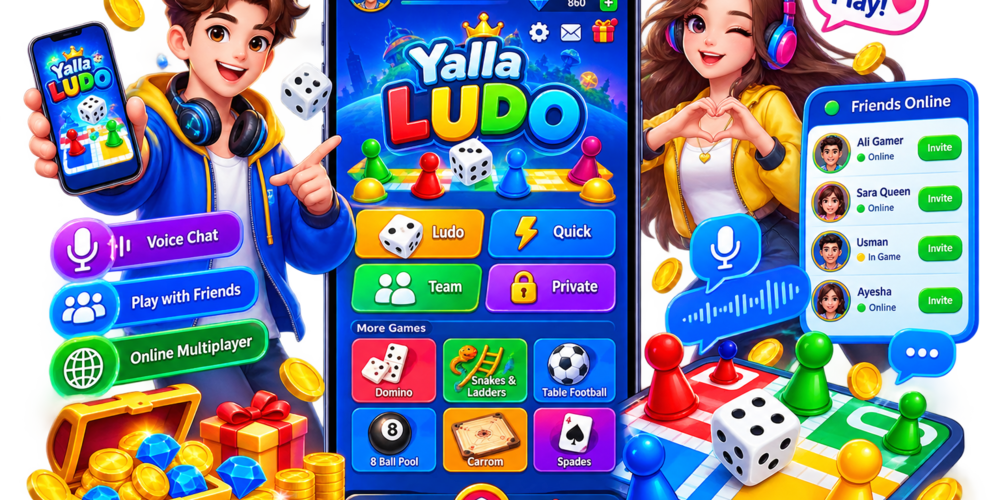
Many Android users search for “Yalla Ludo APK” because they want the latest version, offline installation options, or access in regions where the Play Store experience differs. This guide explains what the app actually is, how multiplayer and voice features work, how to install it safely, what coins and gifts mean, common problems, and how it compares with other Ludo apps.
The goal is practical help: understand the game, install it carefully, protect your account and privacy, and decide whether it fits the way you like to play. Version numbers, file sizes, and exact features change, so always check the official Google Play listing or developer sources before installing.
Table of Contents
What Is Yalla Ludo?
Yalla Ludo is an Android (and iOS) multiplayer board-game application that pairs traditional Ludo-style gameplay with social features, especially real-time voice chat. According to its Google Play description, it fuses classic board games—Ludo, Jackaroo, and Domino—with voice communication so players can talk, joke, and coordinate during matches.
Core idea: you create or join rooms, play against other people (or with friends), use voice chat, and interact through virtual items and gifts. Modes typically include variations such as Classic, Master, Quick, and Arrow for Ludo, plus team options and other game types. Private rooms, local rooms, and public voice-chat rooms support different social styles.
It is available on Android via Google Play (package associated with Aviva Sun / Yalla-related listings). The app contains ads and offers in-app purchases. Exact availability of modes, languages, and regional features can vary by version and market. Treat descriptions of “latest features” as subject to change and confirm them in the live app or store page.
Yalla Ludo APK Overview
The table below summarizes publicly available information. Exact version, size, and requirements change with updates—always verify on Google Play or a trusted APK source before downloading.
| Information | Details |
| App Name | Yalla Ludo – Ludo & Jackaroo (and related titles) |
| Category | Board / Casual / Multiplayer |
| Platform | Android (also available on iOS) |
| Developer / Publisher | Listed under Aviva Sun; associated with Yalla Technology / Yalla Group entities. Confirm on the live store page. |
| Latest Version | Changes frequently (examples seen in 2026 include 1.5.x series). Check Google Play or trusted mirror for current build. |
| APK Size | Varies by build and architecture (commonly in the 140–250 MB range for recent APKs). Confirm before downloading. |
| Android Requirement | Typically Android 5.0 and up (verify current listing). |
| Multiplayer | Yes – online rooms and matches |
| Voice Chat | Yes – real-time voice chat in games and rooms |
| In-App Purchases | Yes – virtual currency, gifts, VIP and related items |
| Ads | Contains ads (per store listing) |
Note: Download counts and ratings appear on Google Play and change over time. This article does not invent or guarantee any ranking or user figures.
Key Features of Yalla Ludo
Multiplayer Ludo
Players compete online against others or with friends. Ludo modes commonly include 2-player and 4-player options as well as team play. Within those, gameplay styles such as Classic, Master, Quick, and Arrow appear in store descriptions. Magic tools or special items may be available in some modes to add variety. The exact rule set and balance can differ by mode and update.
Online Rooms
Rooms let players create or join matches. Private rooms support friends; public or global rooms connect strangers. Local rooms can allow play with nearby devices in some versions. Room systems are central to how multiplayer sessions are organized.
Voice Chat
Real-time voice chat is one of the main differentiators from many offline-only Ludo apps. Players can talk during matches, share tips, react to moves, or simply socialize. Separate voice-chat rooms also exist for broader conversation. This social layer makes sessions feel more like sitting around a physical board with friends—but with strangers from many places.
Friends and Social Features
Users can add friends, invite them to rooms, and interact through chat and gifts. Social features encourage returning to play with the same people. Always treat online friends as people you may not fully know; privacy and personal-safety habits still apply.
Multiple Game Modes
Beyond standard Ludo, the app promotes Jackaroo and Domino. Jackaroo includes modes described as Basic, Complex, and Quick. Domino offers styles such as Draw Game and All Five. Additional mini-games or events may appear in updates. Confirm which modes are active in the version you install.
In-Game Coins and Items
Virtual coins, diamonds, gifts, stickers, and VIP benefits are part of the economy. Coins and items are used for in-game activities, cosmetics, or room privileges. They are virtual. They are not the same as real-world cash unless a specific, verified cash-out or payment feature is explicitly offered by the official operator and legal in your region. Treat any “earn money” or “unlimited coins” claims from third-party sites with extreme caution.
Events and Tournaments
The app periodically adds events (for example, special Ludo variants or lucky-spin style features mentioned in update notes). Competitive rooms and VIP rooms may offer different stakes or rewards. Availability and rules change; check in-app announcements.

How to Download Yalla Ludo APK on Android
Prefer the official Google Play Store whenever possible. APK sideloading is useful when the store is unavailable or for specific device needs, but it carries extra risk.
Step 1: Verify the Source
Download only from Google Play or a well-known, reputable APK repository that publishes hashes and scan results. Random “free Yalla Ludo unlimited coins” sites are high-risk. Fake apps often imitate popular names to deliver malware.
Step 2: Check the APK Information
Before installing, note the version number, approximate file size, package name (related to com.yalla.yallagames on official builds), developer name, and last update date. Compare with the Google Play listing when possible.
Step 3: Download the APK
Use a stable connection. Prefer Wi-Fi to avoid mobile data costs on larger files. Save the file to a known location such as Downloads.
Step 4: Review Android Security
Android blocks unknown sources by default for good reason. Temporarily allow installation from the specific source only if you trust it, then return the setting to restricted. Do not leave “install from unknown sources” permanently enabled for all apps.
Step 5: Install Yalla Ludo
Open the APK, review the permissions requested, and complete the installer prompts.
Step 6: Open and Update the App
Launch the app, sign in or create an account, and apply any in-app or store updates. Keeping the game current reduces crashes and security issues.
How to Install Yalla Ludo APK
- Download the APK from a verified source.
- Open the file from your notification or file manager.
- If prompted, allow the installer for this one source.
- Read the permission list and accept only what you understand.
- Wait for installation to finish, then open the app.
- Complete first-run setup, login, or registration.
- Check for updates inside the app or via the Play Store.
If Android refuses to install: free up storage, confirm the APK is not corrupted (re-download), ensure the Android version meets the minimum, and disable any conflicting security app temporarily only if you trust the file. Re-enable protections afterward.
How to Create a Yalla Ludo Account
Registration flows vary by version and region. Typical steps include:
- Open Yalla Ludo.
- Choose login or registration (phone, email, or third-party options may appear).
- Enter the required details and complete any verification (SMS or similar).
- Create or confirm your profile nickname and avatar.
- Accept the terms and privacy policy.
Use a strong, unique password. Prefer official recovery options if you lose access. Never share OTP codes or passwords with anyone claiming to be support.
How to Play Yalla Ludo
Beginner overview:
- Start the app and enter a game lobby or create/join a room.
- Select Ludo (or Jackaroo / Domino) and the desired mode and player count.
- Wait for other players or invite friends.
- When your turn comes, roll the dice (or use the app’s equivalent) and move your pieces according to the mode rules.
- Capture opponents or reach the home stretch depending on the variant.
- The first player (or team) to complete the winning condition wins the match.
- Use voice chat for coordination or fun; mute if needed.
- Leave politely or use the in-app exit option; repeated mid-game quits may affect matchmaking reputation in some systems.
Etiquette matters: avoid toxic language, respect other players, and report clear abuse through official channels.
Yalla Ludo Voice Chat
Voice chat runs in real time during matches and in dedicated rooms. Enable the microphone permission when the app requests it. You can usually mute yourself or others, and many social apps provide report or block tools.
Privacy reminder: Do not share phone numbers, passwords, OTP codes, banking details, home addresses, or other sensitive information with strangers. Voice and text chat with unknown players should stay light and game-related. If someone pressures you for personal data or money, leave the room and report them.
Yalla Ludo Coins, Gifts and Virtual Items
Virtual currency (coins, diamonds, etc.) is used inside the game for activities, cosmetics, gifts, and sometimes room privileges. Gifts are virtual items players can send. VIP subscriptions may unlock daily rewards or special rooms.
These items have value only within the game’s systems. They are not guaranteed real-world money. Any third-party site promising “free unlimited coins,” “cash withdrawal hacks,” or “mod APKs that unlock everything” is almost always a scam or malware vector. Only purchase through official in-app channels if you choose to spend.
Is Yalla Ludo Free to Play?
The app itself can be downloaded and installed without paying for the application. You can play many matches without spending money. However, the game contains ads and offers in-app purchases (virtual currency, gifts, VIP). Optional paid items exist. It is free to start, but not completely free of monetization.
Yalla Ludo In-App Purchases
Purchases typically cover virtual coins, diamonds, gifts, VIP memberships, and related cosmetics or privileges. Spending is optional for basic play. Parents and guardians should use Google Play family controls or device purchase locks. Protect payment methods with strong device security and never share payment credentials inside chat.
Is Yalla Ludo Safe?
APK Source
The safest route is Google Play. Unofficial APK sites vary widely in trustworthiness. Prefer sources that show virus-scan results and transparent package information. Avoid sites that push “MOD,” “unlimited money,” or “hack” versions.
Permissions
Review microphone (for voice chat), storage, and any other permissions. Grant only what is needed for the features you use.
Account Security
- Use a strong, unique password.
- Enable any available account protections.
- Never share login credentials or OTP codes.
- Beware of phishing messages that pretend to be official support.
Voice Chat Safety
Do not disclose phone numbers, passwords, OTPs, banking information, addresses, or other sensitive data. Mute, block, or report abusive users.
Fake and Modified APKs
Malicious APKs often reuse the Yalla Ludo name. “Unlimited coins,” “cracked,” or “MOD” packages are high-risk. They can steal accounts, inject malware, or harvest data. Stick to official or carefully verified builds.
Yalla Ludo APK vs Official App
An APK is simply the Android application package format. The official app distributed through Google Play is also an APK under the hood. The difference is trust and update channel:
- Official Google Play app: signed by the developer, updated through the store, reviewed by Google’s processes.
- Sideloaded APK from a trusted mirror: same package if it matches the official build, but you handle updates and verification yourself.
- Modified/cracked / “unlimited” APKs: altered code, high malware and ban risk—avoid.
The word “APK” alone does not make a file safe or unsafe. Source and integrity matter.
Yalla Ludo Problems and Troubleshooting
Yalla Ludo APK Won’t Install
Possible causes: incompatible Android version, corrupted download, insufficient storage, security restrictions, or wrong architecture package. Solutions: free up space, re-download from a trusted source, confirm Android 5.0+ (or the current minimum), and temporarily allow the specific installer source.
Yalla Ludo Keeps Crashing
Try restarting the device, updating the app, clearing cache, checking free storage, and reinstalling from a verified source. Close heavy background apps.
Yalla Ludo Login Not Working
Check internet connection, confirm credentials, update the app, and use official recovery if available. Avoid third-party “login fix” tools.
Voice Chat Not Working
Grant microphone permission, test the mic in system settings, ensure a stable connection, and update the app. Mute/unmute toggles inside the room may also help.
Game Is Lagging
Use a stable Wi-Fi or strong mobile data connection, close background apps, and ensure the device is not overheating or critically low on storage. Server-side load can also affect match quality; that is outside your control.
Yalla Ludo for Low-End Android Phones
The app has run on Android 5.0+ in many listings, which covers a wide range of devices. Performance still depends on RAM, CPU, free storage, and network quality. On low-end phones: keep storage free, close background apps, prefer lighter graphics settings if available, and use a stable connection. Exact minimum hardware is not always published; if the official listing does not state it, test carefully and uninstall if the experience is poor.
Yalla Ludo for Pakistan
Yalla Ludo is available to Android users in many regions, including Pakistan, through Google Play or APK installation where the store is used. A stable internet connection is required for online multiplayer and voice chat. Language support includes English and other languages depending on the build; Arabic and regional interfaces appear in many Middle East / South Asia focused versions.
In-app purchases use the payment methods supported by Google Play or the app’s own billing in your region. Follow local laws regarding online gaming and any real-money elements. This article does not provide legal advice—check current Pakistani regulations if you engage with paid or competitive features. Practice responsible play and protect personal data in voice rooms.
Yalla Ludo Pros and Cons
| Pros | Cons |
| Online multiplayer Ludo and related board games | Requires internet for online features |
| Real-time voice chat adds social fun | Voice chat raises privacy and moderation concerns |
| Familiar Ludo rules with extra modes | Contains ads and in-app purchases |
| Rooms for friends and public play | Performance depends on device and network |
| Free to download and start playing | Unofficial/mod APKs create serious security risks |
| Regular updates and events | Virtual items are not real-world cash |
Yalla Ludo Alternatives
Other multiplayer Ludo apps serve similar needs with different strengths. None is universally “best.”
| App | Multiplayer | Voice Chat | In-App Purchases | Best For |
| Yalla Ludo | Strong online rooms | Yes | Yes | Social Ludo + voice |
| Ludo King | Very popular multiplayer | Varies/limited | Yes | Classic Ludo focus |
| Ludo Club | Online multiplayer | Limited | Yes | Club-style competition |
| Ludo Star | Multiplayer | Check current build | Yes | Casual online Ludo |
Try free versions and compare room quality, voice reliability, and monetization style before deciding.
Tips for a Better Yalla Ludo Experience
- Use a stable internet connection for smoother matches and voice.
- Keep the app updated from a trusted channel.
- Avoid suspicious APK files and “unlimited coins” promises.
- Protect your account with a strong password and never share OTPs.
- Do not share personal or financial information in chat.
- Use mute, block, and report tools when needed.
- Monitor or limit in-app spending.
- Take breaks and play for enjoyment rather than pressure.
Responsible Gaming
Virtual coins and gifts are entertainment items, not income. Do not spend money you cannot afford to lose. Set personal limits, avoid chasing losses, and do not borrow money for gaming. Follow age ratings and local laws. If play starts to feel stressful or compulsive, step away and seek support resources available in your region.
Is Yalla Ludo Worth Downloading in 2026?
Yalla Ludo is worth considering if you want online multiplayer Ludo (plus related board games) with real-time voice chat and social rooms. The combination of classic rules and live conversation is the main appeal. It is less ideal if you only want offline single-player Ludo, dislike voice social features, or prefer apps with lighter monetization.
Security and source matter more than the brand name. Download from Google Play or a carefully verified APK source, review permissions, and keep expectations realistic about virtual items. Players who enjoy social board games and can manage privacy and spending are the best fit.
What is Yalla Ludo?
A multiplayer board-game app featuring Ludo, Jackaroo, Domino, and real-time voice chat.
Is Yalla Ludo free?
Free to download and start; contains ads and optional in-app purchases.
Is Yalla Ludo available on Android?
Yes. It is listed on Google Play and can also be installed via APK where appropriate.
How do I download Yalla Ludo APK?
Prefer Google Play. If using an APK, choose a reputable source, verify the version and size, then install carefully.
How do I install Yalla Ludo APK?
Open the file, allow the trusted source if prompted, review permissions, and complete installation.
Is Yalla Ludo safe?
The official app from trusted channels is widely used. Unofficial mod/cracked APKs and phishing are the main risks.
Does Yalla Ludo have voice chat?
Yes—real-time voice during matches and in chat rooms.
Can I play Yalla Ludo with friends?
Yes, via private rooms and friend invites.
Does Yalla Ludo require an internet connection?
Yes, for online multiplayer and voice features. Some local/offline options may exist depending on the version.
Does Yalla Ludo contain in-app purchases?
Yes.
Can I play on a low-end Android phone?
Often possible on Android 5.0+, but performance varies. Free up storage and use a stable network.
Final Verdict
Yalla Ludo is a social multiplayer board-game app that brings Ludo, Jackaroo, and Domino together with real-time voice chat and online rooms. It suits players who enjoy talking while they play and competing with friends or strangers. The official Android version is free to download, contains ads, and offers optional in-app purchases for virtual items and VIP features.
If you decide to install it, prefer Google Play or a carefully verified APK source, review permissions, protect your account, and never share sensitive information in voice or text chat. Virtual coins are not real money. Play for entertainment, set spending limits, and stay aware of privacy.
Players who want pure offline Ludo or minimal social features may prefer lighter alternatives. For those seeking an online, voice-enabled Ludo experience, Yalla Ludo remains a relevant option in 2026—provided it is obtained and used responsibly.




