
OmniRoute Simplified: Your All-in-One Pass to Free AI (No Tricks!)
NOW
7.34MB
V1.1.71
android 5+
12500
Description
The AI Bill Shock — And How OmniRoute Fixes It
If you use AI tools like ChatGPT, Claude, or coding assistants like Cursor, you know the pain.
You’re deep into a project when a red error pops up: “You’ve used up your free credits for this month.” So you switch to another tool. Same message. You pull out your credit card, sigh, and pay another $20. Then another.
It adds up fast — and for students, hobbyists, or anyone just trying to build something cool, these costs become a real barrier.
But what if there were a way to tap into almost any AI model out there, for free, without constantly hitting a wall?
Meet OmniRoute.
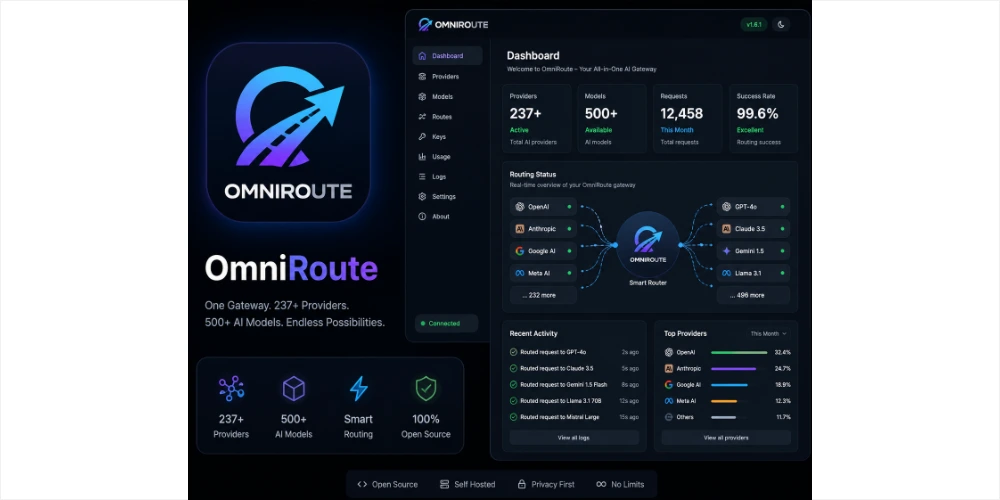
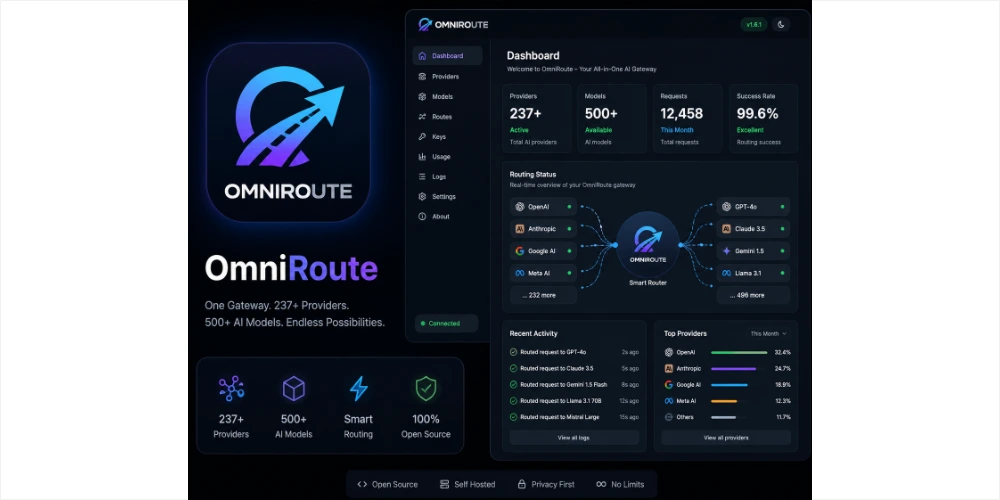
It’s not a trick, and it’s not a hacked account. It’s an open-source tool that acts like a smart traffic controller for your AI requests—connecting you to dozens of AI providers that offer free trials, and bundling them into one seamless interface.
This guide covers what OmniRoute is, how to install it, how to set it up, and whether it’s actually worth your time.
What Is OmniRoute? (The Simple Version)
Imagine you want a glass of juice. Normally, you’d walk to one shop, and if they’re out, you’d have to walk to the next one yourself.
Now imagine a waiter who checks 200 shops at once, finds whichever one has juice available right now (ideally for free), brings it to your table, and quietly switches shops the moment one runs dry — all without you noticing.
That’s OmniRoute, for AI.
Technically, it’s a proxy — a gateway that sits between your AI app (Cursor, ChatGPT, whatever) and the actual AI companies behind the scenes (Google, OpenAI, Anthropic, and others). Instead of connecting your app directly to one provider, you connect it to OmniRoute, and OmniRoute handles the routing across a long list of providers and models on your behalf.
The Free Tier Advantage
OmniRoute aggregates free credits from dozens of AI companies — enough, combined, to add up to a substantial monthly token allowance. Several of these providers offer free access indefinitely, with no time limit.
(Quick refresher: a “token” is roughly a word or word-fragment. A billion tokens is enough text to fill thousands of books.)
Table of Contents
Why It’s Worth Considering
1. It saves you real money. Developers using AI to write code can easily spend $20–$60 a month on API fees. OmniRoute can bring that down to zero for many workflows by cycling through free trials instead of paid quota.
2. It doesn’t fall over when one provider does. If a provider goes offline or your free credits run dry, OmniRoute automatically falls back to another provider in under a second. No more staring at a quota error mid-task.
3. It stretches your tokens further. A built-in compression feature trims unnecessary data before sending your request — cutting token usage significantly and making free-tier limits last much longer.
How to Install It
Option 1: The One-Line Command (Easiest)
If you’re comfortable with Terminal (Mac/Linux) or Command Prompt (Windows), this is the fastest route.
First, install Node.js — a free runtime. Use version 18–22 (avoid version 24+ for now).
npm install -g omniroute@latest
Then run:
omniroute
It will automatically open a dashboard in your browser.
Option 2: Desktop App (No Terminal Required)
- Head to the OmniRoute GitHub page or website.
- Find the Releases section.
- Download the installer for your OS (
.exefor Windows,.dmgfor Mac). - Install it like any other application.
Option 3: Docker (For Developers Who Like Containers)
docker pull diegosouzapw/omniroute:latest
docker run -p 20128:20128 diegosouzapw/omniroute:latest
Regardless of install method, the dashboard runs locally at http://localhost:20128
Setting It Up
There’s no OmniRoute account to create—you’re not signing up for anything. Instead, you’re linking your existing provider accounts through the local dashboard.
Step 1 — Log in. Go to http://localhost:20128.
- Username:
admin - Password:
123456
⚠️ Change this password immediately in Settings before doing anything else.
Step 2 — Add providers Open the Providers tab. You’ll see a list of AI companies—some free forever, some requiring your own API key.
- OAuth-based providers: click Connect and authorize through Google/GitHub.
- API-key providers: generate a key on that provider’s site, then paste it into OmniRoute.
You don’t need to connect all of them — just the free-forever ones or the ones you already use.
Step 3—Create a “Combo.” A combo is essentially a playlist of models. Create one, name it, add your connected providers, and set the order (or let it default to Auto).
Step 4 — Generate your API key In the API Manager, click Create API Key and save it somewhere safe — you’ll need it to connect other apps.
Connecting Your Apps
Cursor / VS Code Settings → Model/AI section → set Base URL to paste your OmniRoute API key → save.
Claude Code / Codex (CLI tools)
export ANTHROPIC_BASE_URL=http://localhost:20128/v1
Your tools keep working exactly as before — they just don’t know they’re being routed.
Just want to chat? The dashboard has a built-in Playground where you can test any connected model directly.
Pros and Cons
The Good
- 💰 Effectively free — combined free-tier access across dozens of providers
- 🔄 No downtime — automatic failover between providers
- 📦 One dashboard — no more juggling separate API keys everywhere
- 🚀 Fast switching — routing decisions happen in milliseconds
- 📉 Token-efficient — compression stretches free-tier limits further
- 🔓 Open source — the code is publicly auditable
The Not-So-Good
- 😅 Setup isn’t beginner-friendly—you’ll want basic comfort with terminals and API keys
- 🌐 Dependent on others—if providers pull their free tiers, OmniRoute can’t do anything about it
- 📖 A lot of surface area — many routing strategies and settings can feel overwhelming at first
- 🔒 Security is on you—change that default password, or anyone on your network can access it
- 📱 No native mobile app
Frequently Asked Questions
Is OmniRoute actually free?
Yes — the software itself is free, and so are the provider tiers it connects to.
Do I need an OmniRoute account?
No. It runs entirely locally; there’s no central account system.
Is this against the rules?
You’re using your own accounts and the free allowances providers already offer—but it’s worth reading each provider’s terms of service, since automating account switching or reusing OAuth sessions across tools may fall outside what some providers intend for free-tier use.
Is my data safe?
Your keys and settings stay on your machine since OmniRoute runs locally. That said, your actual prompts and data still go to whichever AI provider handles the request — so their privacy policy still applies.
Installation error?
Most issues trace back to Node.js version mismatches. Run node -v to check, and switch to an LTS version (e.g., 22.x) if needed.
Can I share it with friends?
Technically yes, but exposing it publicly means anyone can burn through your connected free credits. Keep it local, or restrict access carefull
Is There a Mobile App?
Short answer: no. OmniRoute isn’t on the Play Store or App Store — it needs a persistent backend process, which doesn’t suit typical mobile app sandboxing.
Workarounds:
- Browser access — open your computer’s local IP address from your phone’s browser to reach the dashboard.
- Termux (Android) — technically possible to run OmniRoute directly on-device via Termux, though it’s heavier on battery life.
No official mobile app has been announced; the team is currently focused on the desktop experience.
Is It Worth Your Time?
Consider it if:
- You use Cursor, Claude Code, or Copilot daily and keep hitting limits
- You’re working with a tight budget as a student or hobbyist
- You want to experiment across multiple AI models without juggling ten separate accounts
Skip it if:
- You only use AI through a web chat interface, not via API
- You’re not comfortable with terminal commands or API keys
- Cost isn’t a concern for you
Bottom Line
OmniRoute won’t make sense for everyone, but for developers and tinkerers watching their API spend, it solves a real annoyance: constantly hitting quota walls and manually switching providers. The setup takes a bit of patience — expect to spend some time reading through the dashboard and connecting accounts — but it can meaningfully cut down on recurring costs.
Worth flagging honestly: this kind of tool works by stacking together free trials across many providers and automating the switching between them. That’s a gray area with some providers’ terms of service, so it’s worth reading the fine print for anything you connect, rather than assuming it’s automatically fine everywhere.
Quick-Start Checklist
- Install Node.js (v22 LTS recommended)
- Install OmniRoute via
npm install -g omniroute@latest - Log in at
localhost:20128 - Change the default password immediately
- Connect 2–3 free-tier providers
- Point your coding tool’s Base URL to OmniRoute
Disclaimer: OmniRoute is open-source software. Always review the terms of service of any AI provider you connect with, and use free-tier access responsibly.




