
Meridian AI Work Journal (2026) Download: The Smarter Way to Reflect, Track, and Grow at Work
now
7.25MB
v1
10k
Description
Introduction
Most workdays end the same way: you close your laptop, and within an hour you can barely remember what you actually did. You were busy — meetings back to back, messages flying, tasks checked off — but ask yourself what you accomplished, or what patterns are quietly draining your energy, and the answer gets fuzzy fast. That’s not a memory problem. It’s a reflection problem, and most of us simply don’t have a system for it.
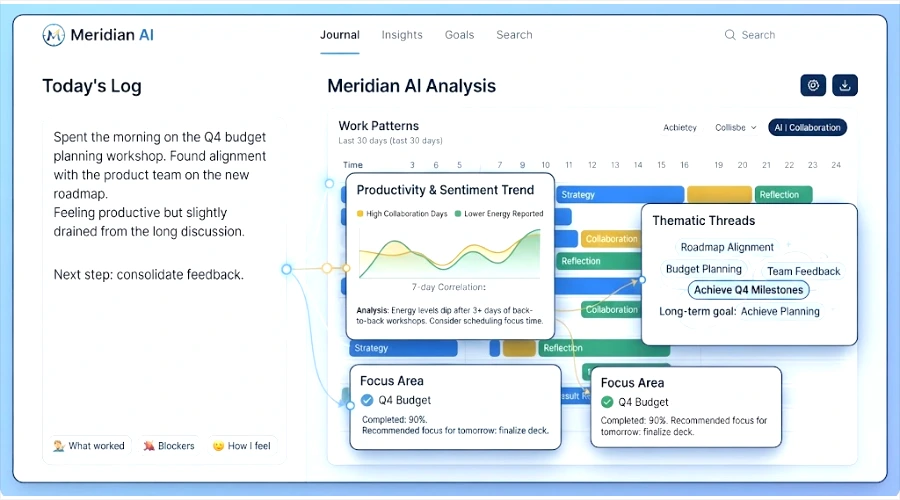
Work journaling has long been the antidote — a habit of jotting down what happened, what worked, and what didn’t. But a blank page only gets you so far. Most people either abandon the habit within a few weeks or end up with pages of notes they never revisit.
Meridian AI Work Journal is built for that gap. It’s an AI-powered work journal that takes your daily entries and turns them into structured, personalized insights — surfacing patterns in your productivity, mood, and priorities that would otherwise stay buried in a notebook. In this guide, we’ll cover what it is, how it works, its core features, and how to use it to build a genuinely useful reflection habit.
Table of Contents
What Is Meridian AI Work Journal?
At its core, Meridian AI Work Journal combines a traditional work journal with an AI analysis layer. You write short entries — what you worked on, what got in the way, how the day felt — and the tool reads across those entries over time to surface things a human would need weeks of notebook flipping to notice.
That’s the key difference from a plain notes app or a paper journal: a notes app stores what you write, but it doesn’t do anything with it. Meridian is designed to actively process your entries — tagging themes, tracking sentiment, and connecting daily reflections back to your longer-term goals — so the journal becomes something you can query and learn from, not just a growing pile of text.
It’s also a step beyond a generic AI chatbot. Rather than starting a new conversation each time with no memory of yesterday, a work journal built for this purpose is meant to hold a continuous record specifically structured around your work, so the insights compound the longer you use it.
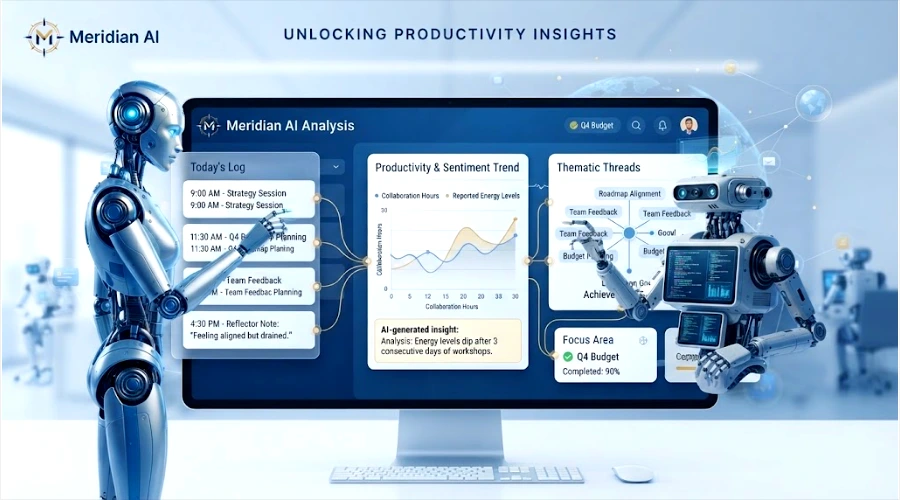
Key Features of Meridian AI Work Journal
AI-Generated Insights
Instead of leaving you to reread weeks of entries yourself, Meridian is designed to generate summaries of your daily and weekly logs, highlighting recurring themes and suggesting where you might adjust your approach — the equivalent of a coach who’s read every entry you’ve written.
Smart Tagging & Categorization
Entries can be automatically organized by project, mood, or productivity level, so instead of a flat list of notes, you get a structured, searchable record. Over time, this makes it possible to answer questions like “which project has been draining me the most this month?” without manually sorting through anything.
Sentiment & Tone Analysis
By analyzing the tone of your entries, the tool can help surface emotional trends — which tasks or projects tend to energize you, and which ones quietly wear you down. This kind of pattern is easy to miss day to day but obvious once it’s plotted out over a few weeks.
Goal Tracking & Alignment
Daily reflections aren’t much use if they’re disconnected from what you’re actually trying to achieve. A goal-tracking layer connects individual entries back to longer-term professional objectives, so you can see whether your day-to-day work is actually moving you toward them.
Integrations
A work journal is most useful when it doesn’t require extra manual entry. Look for support for syncing with the tools you already use — calendars, task managers, and communication platforms such as Google Calendar, Slack, and Notion — so context is pulled in rather than retyped.
Privacy & Security
Because a work journal often contains sensitive reflections about your job, your team, and your performance, data encryption and clear user control over your information matter. Before committing to any journaling tool, it’s worth checking exactly how your data is stored, who can access it, and whether you can export or delete it on demand.
Customizable Prompts
Blank-page paralysis is one of the biggest reasons journaling habits fail. Guided reflection prompts — tailored to your role and goals — give you a starting point each day instead of a blinking cursor.
Benefits of Using It
- Improved self-awareness and emotional intelligence — seeing your patterns in writing, rather than trying to recall them from memory
- Enhanced productivity through better prioritization — noticing what actually moves your goals forward versus what just feels busy
- Reduced burnout by catching overwork patterns before they become a crisis
- Better decision-making, grounded in your own historical data rather than a general impression of “how things have been going”
- More meaningful performance reviews and one-on-ones, backed by a real record of wins and challenges instead of a rushed memory dump the night before
- A centralized record of achievements and lessons learned that you can actually search later, instead of a drawer full of loose notes
How It Works (Step-by-Step)
- Create an account and set up your profile. Define your goals and choose the reflection prompts most relevant to your role.
- Log daily or weekly entries about your work, challenges, wins, and reflections — as short or as detailed as you like.
- The AI engine analyzes your entries, tagging themes and detecting patterns as your journal grows.
- Receive AI-generated reports on a weekly or monthly basis, summarizing trends and surfacing actionable insights.
- Use those insights to adjust your workflow, refine your goals, and recognize the progress you’re actually making.
Use Cases and Real-World Applications
Individual contributors can use it to track deep work sessions, identify recurring distractions, and walk into performance reviews with a real record instead of a foggy memory of the last six months.
Managers and team leads can use aggregated, consented team journaling to monitor overall sentiment, spot early signs of burnout, and make one-on-ones more specific and useful.
Freelancers and solopreneurs juggling multiple clients can use it to keep projects straight, reflect on what each engagement actually required, and get a clearer sense of where their time and energy really go.
Remote workers can use it to combat the isolation and “out of sight” feeling that comes with distributed work — maintaining a visible record of contributions and staying anchored to team goals even without daily in-person check-ins.
Meridian vs. Traditional Journaling & Other Tools
| Tool Type | Strength | Limitation |
| Pen-and-paper journaling | Low friction, private by default | No pattern detection; easy to abandon; not searchable |
| General note-taking apps | Flexible, fast to capture | Passive storage only — no analysis or insight generation |
| Task managers | Great for tracking what’s due | Focused on tasks, not reflection or emotional patterns |
| Meridian | Combines capture with AI-driven pattern detection and goal alignment | Requires consistent use to build up enough data for meaningful insights |
The unique value isn’t the journaling itself — it’s what happens after you write. Automated summaries, sentiment trends, and pattern detection turn scattered daily notes into something you can actually act on.
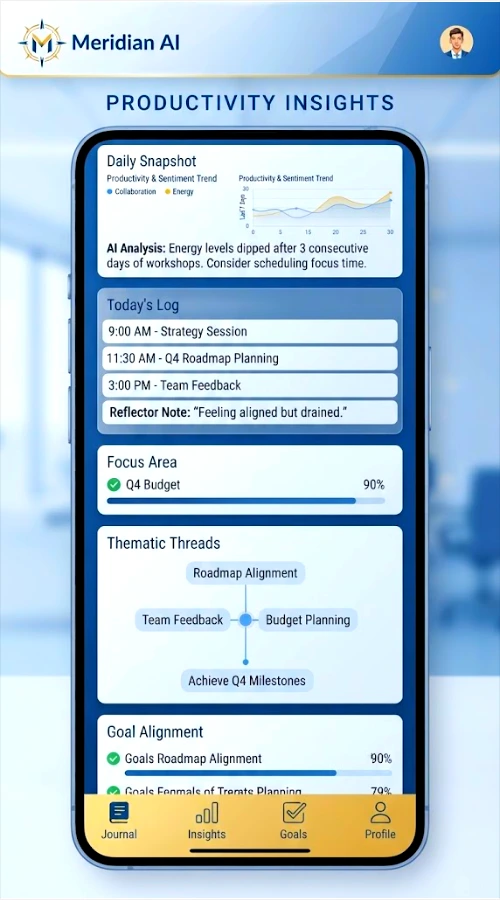
Tips for Getting the Most Out of It
- Be consistent. Even two or three sentences a day builds a far more useful record than one long entry a month.
- Use the AI prompts when you’re not sure what to write — they’re there to push past surface-level notes into more useful reflection.
- Review your weekly reports and set one small improvement goal based on what you notice, rather than trying to fix everything at once.
- Combine it with your existing productivity system instead of replacing it — the journal works best as the reflective layer on top of however you already manage tasks.
- Experiment with formats — bullet points, voice notes, or longer-form entries — to find what you’ll actually stick with.
Is my data private and secure?
Data privacy is a core consideration for any work journaling tool, since entries often include sensitive reflections about your job and team. Check the specific encryption practices and data controls on Meridian’s official site before entering sensitive information.
How is this different from using ChatGPT or a generic AI assistant?
A generic AI assistant doesn’t retain a structured, ongoing record of your work by default. A dedicated work journal is built to store entries over time and analyze them as a connected history, which is what makes long-term pattern detection possible.
Can I use it for team journaling or just individual use?
AI work journals in this category are typically designed with individual use as the core experience, with some offering team or manager-level views for aggregated (and consented) insights. Confirm current team functionality directly with Meridian.
Does it integrate with my existing tools?
Integrations with calendars, task managers, and communication platforms are a common feature in this category, reducing the need for manual data entry. Check the current integration list on the official site, since these change over time.
How much time does it take to maintain a work journal?
Most effective work journals only require a few minutes a day. The value comes from consistency rather than length — a short daily entry compounds into a much more useful record than infrequent long ones.
Conclusion
A work journal only pays off if you actually keep it — and if what you write down turns into something useful later. Meridian is built around that second part: instead of leaving your notes to pile up unread, it’s designed to surface the patterns in your productivity, mood, and goals that are otherwise easy to miss in the middle of a busy week.
If you’ve tried journaling before and let it lapse, or you’re looking for a more structured way to reflect on your work, it’s worth exploring what an AI-assisted approach can add. Learn more and start your free trial of Meridian AI Work Journal today at the official website.




