
Lovable AI: The World’s First AI FullStack Engineer
now
60MB
v1
Android 5+
5k
Description
Building software used to mean learning programming languages, setting up servers, designing databases, and writing thousands of lines of code. Today, tools such as Lovable AI aim to change that experience. Users can describe an idea in everyday language and receive a working web application that includes pages, logic, data storage, and login features.
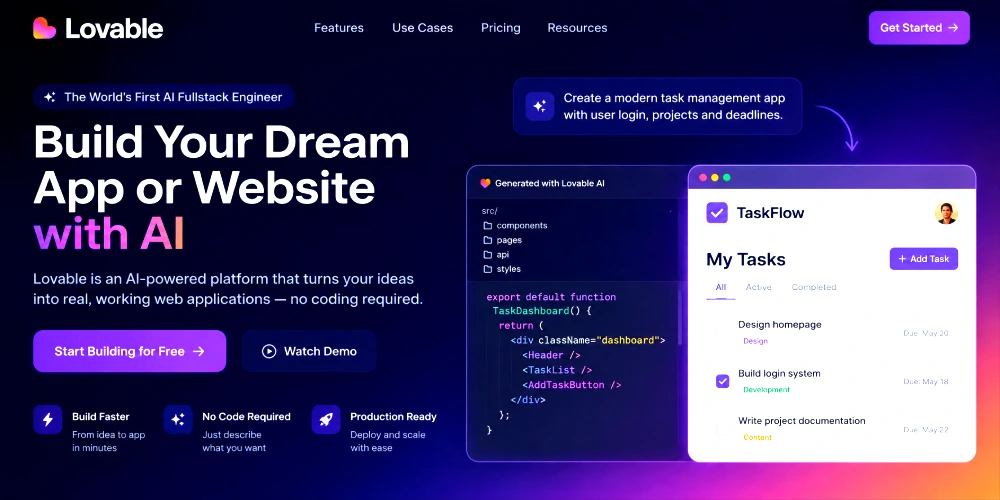
Lovable AI positions itself as an AI fullstack engineer. Instead of only suggesting code snippets, it helps create complete applications from natural-language instructions. This approach appeals to beginners, students, entrepreneurs, designers, and even experienced developers who want to prototype faster.
This article explains what Lovable AI is, how an AI fullstack engineer works, the main features, practical steps for getting started, example prompts, benefits and limitations, pricing considerations, and how it compares with traditional development and other AI tools. Features and pricing can change, so always check the official Lovable website and documentation for the latest information.
Table of Contents
What Is Lovable AI?
Lovable AI is an AI-powered platform that helps people build production-oriented websites and web applications by describing what they want in plain language. You chat with the system the way you might brief a developer. The platform then generates and iterates on a real codebase that typically includes a modern frontend, backend services, database, authentication, and deployment options.
Users interact mainly through a chat interface inside a browser-based workspace. You can start from a short description, a longer brief, screenshots, or documents. Lovable interprets the request, creates an initial version of the application, and shows a live preview. From there, you continue the conversation: ask for new pages, change the design, add login, connect a database, or fix problems.
The goal is to reduce the amount of manual coding required for common product ideas. Traditional development requires writing and connecting frontend, backend, and infrastructure pieces by hand. An AI-assisted workflow still benefits from clear thinking and review, but the platform handles much of the initial generation and iteration.
Lovable emphasizes ownership of the generated code. Projects can be synced to GitHub or GitLab, so developers can continue work in their preferred tools. The platform is designed for both non-technical builders and teams that want to move from idea to working software more quickly.
What Is an AI FullStack Engineer?
Fullstack development normally covers the complete set of skills needed to deliver a working application:
- Frontend – the pages and interfaces users see and interact with
- Backend – the server-side logic that processes requests and business rules
- Database – storage and retrieval of structured information
- APIs – the connections that let different parts of the system talk to each other
- Authentication – user accounts, login, and permission controls
- Application logic – the specific rules that make the product useful
- Deployment – putting the application online so others can use it
An AI fullstack engineer is a system that can assist with many of these layers from natural-language instructions. Instead of hiring separate specialists or learning every technology yourself, you describe the product and the AI helps generate the corresponding pieces. Lovable AI is marketed in this category: it aims to produce coherent frontend, backend, data, and auth foundations from a single conversation.
This does not mean the AI replaces all human judgment. Architecture decisions, security reviews, testing, and product strategy remain important. The value is in accelerating the path from idea to a testable application.
How Does Lovable AI Work?
The basic workflow is conversational and iterative:
- Describe your idea using natural language. Be as clear as you can about the goal, main pages, users, and key actions.
- Lovable interprets the request and generates an initial application structure.
- The platform creates or updates frontend pages, backend pieces, and supporting infrastructure where supported.
- You review the live preview and the generated result.
- You ask for changes, improvements, or new features in follow-up messages.
- You test the application carefully, checking flows such as signup, forms, and data display.
- You continue refining until the project meets your needs, then publish or export it.
Example prompt: “Create a modern online bookstore with user login, product categories, search, shopping cart, and a checkout page.”
From a request like this, a user can expect an initial multi-page application with navigation, sample product listings, basic account flows, and a shopping-related structure. The exact quality and completeness depend on the current capabilities of the platform, the clarity of the prompt, and how much iteration follows. Always treat the first version as a starting point that needs testing and refinement.
Key Features of Lovable AI
AI App Building
Users describe an application idea and receive a generated foundation that includes interface and supporting logic. This supports rapid prototyping of SaaS tools, internal dashboards, booking systems, and similar products.
AI Website Development
Lovable can also produce websites and landing pages. Descriptions, screenshots, or design references can guide the layout and content. Websites can include forms, user accounts, and other interactive elements rather than remaining purely static.
Natural-Language Prompts
Ordinary language is the main interface. Clear, specific prompts produce better results than vague ones. Follow-up messages let you steer the project without rewriting everything from scratch.
Frontend Development
The platform generates user interfaces and pages using modern web technologies (commonly React-based stacks with styling systems such as Tailwind). Visual editing options allow direct tweaks to text, colors, and layout in some workflows.
Backend Development
Backend functionality handles data processing, business rules, and secure operations. Lovable aims to provision backend services as part of the generation process so that the application can do more than display static content.
Database Integration
Databases store information such as user profiles, products, or records. Lovable integrates with backend services (notably Supabase in documented workflows) to help set up tables, queries, and related policies so that data can be saved and retrieved.
Authentication
User accounts and login systems are common requirements. Where supported, the platform can help configure authentication flows so that different users see appropriate content and actions.
Editing and Iteration
After the first version appears, you continue chatting to add features, fix issues, or change design. Plan and build-oriented modes help separate thinking from implementation on larger changes. Code ownership and Git sync support longer-term development outside the platform if needed.
How to Use Lovable AI
The following steps outline a typical beginner path. Exact screens and options can change; use the official documentation for current guidance.
- Visit the official Lovable website and create an account if required.
- Start a new project inside a workspace.
- Describe your application idea in clear natural language. Include the purpose, main pages, and key features.
- Allow the platform to generate the initial version and preview it.
- Review the result carefully. Check navigation, forms, and any sample data.
- Ask for specific improvements: new pages, design changes, login, or data features.
- Test the application thoroughly. Try the main user journeys and look for errors.
- Use additional prompts to fix problems or add missing pieces.
- When ready, publish using the available hosting options or connect a custom domain where supported.
- Optionally sync the code to GitHub or GitLab for further development or team collaboration.
Always review and test generated output. Do not assume the first version is production-ready.
Example Lovable AI Prompts
Copy and adapt these examples to your own projects:
- Business website: “Create a clean, professional website for a digital marketing agency. Include Home, Services, Case Studies, About, and Contact pages with a contact form.”
- Portfolio website: “Build a personal portfolio site for a product designer. Show selected projects with images, short descriptions, and a contact section.”
- Blog: “Create a simple blog with a list of posts, individual post pages, categories, and a basic search. Use a modern, readable layout.”
- Online store: “Build an online store for handmade candles. Include product listings, product detail pages, a shopping cart, and a checkout flow with sample products.”
- Restaurant website: “Create a website for a local Italian restaurant. Include menu, reservation form, location, hours, and a photo gallery.”
- Booking system: “Build a simple appointment booking system for a freelance consultant. Users can select a date and time, leave contact details, and see confirmation.”
- Dashboard: “Create an internal dashboard that shows sample sales metrics, a list of recent orders, and basic filters. Use a clean admin-style layout.”
- Student management system: “Build a simple student management app where administrators can add students, view a list, and update basic details such as name and enrollment status.”
- To-do application: “Create a personal to-do list app with the ability to add tasks, mark them complete, and filter by status. Support user login so each person sees their own tasks.”
- SaaS application: “Build a simple project-management SaaS starter. Include user signup and login, a list of projects, the ability to create a project, and a basic task list inside each project.”
Who Can Use Lovable AI?
- Beginners – explore ideas and learn how applications are structured without writing every line by hand.
- Students – prototype class projects and experiment with real application concepts.
- Entrepreneurs and startup founders – validate product ideas quickly and create early demos for users or investors.
- Designers – turn visual concepts into interactive prototypes that include real flows.
- Freelancers – deliver client websites and simple apps faster while retaining the ability to export code.
- Small businesses – create internal tools or customer-facing sites without a large development team.
- Developers – accelerate boilerplate and early architecture, then refine or extend the code in familiar tools.
- Product teams – explore concepts and produce shareable prototypes during discovery phases.
Benefits of Lovable AI
- Faster prototyping of websites and web applications from natural-language descriptions.
- Lower barrier for people who do not write code every day.
- Natural-language interaction that feels closer to briefing a collaborator than configuring a complex IDE.
- Reduction of repetitive setup work for common patterns such as pages, forms, and basic data models.
- Support for idea validation before investing heavily in custom development.
- Useful learning path for beginners who can inspect generated structure and iterate.
- Potential time savings for professional developers on early-stage work and internal tools.
Results depend on the clarity of the request, the complexity of the product, and careful testing. Outcomes are not guaranteed to match every expectation on the first attempt.
Limitations of Lovable AI
A balanced view helps set realistic expectations.
- AI-generated code and configurations can contain errors or incomplete logic.
- Complex or highly custom applications often still need technical knowledge and manual refinement.
- Users must test thoroughly; automated generation does not replace quality assurance.
- The system can misunderstand vague or contradictory instructions.
- Security, privacy, and access control require human review.
- Advanced customization beyond the platform’s strengths may require exporting code and continuing in traditional tools.
- Features, credit usage, and pricing can change over time.
AI does not remove the need for testing, security checks, clear product thinking, and human judgment. Treat Lovable as a powerful assistant rather than a complete substitute for engineering practices.
Lovable AI Pricing
Pricing is based on plans and credits. Details change, so verify current information on the official Lovable pricing page. As of publicly listed information around August 2026:
- Free plan – limited daily and monthly credits, suitable for exploration and small experiments.
- Pro plan – commonly listed around $25 per month with a higher monthly credit allowance, custom domains, and removal of platform branding on published projects.
- Business plan – higher tier (commonly around $50 per month) with additional team and governance features.
- Enterprise – custom pricing for larger organizations that need advanced controls and support.
Credits are consumed by build actions, and usage for hosting or in-app AI features may also draw from credit pools depending on the current model. Heavy iteration or complex projects can use credits faster. Student discounts have been offered on some plans. Always confirm exact limits, rollover rules, and included features on lovable.dev before subscribing.
Lovable AI vs Traditional Web Development
| Feature | Lovable AI | Traditional Development |
| Getting started | Describe idea in natural language | Set up tools, write code from scratch |
| Coding knowledge | Helpful but not always required for basics | Usually required for most work |
| Development speed | Often faster for early prototypes | Depends on team size and experience |
| Customization | Strong within platform patterns; export for more | Full control when coding everything |
| Learning curve | Lower for simple products | Higher for fullstack skills |
| Testing | Still required; user responsibility | Still required; user or team responsibility |
| Human involvement | Essential for review and decisions | Essential throughout |
Both approaches have a place. Traditional development offers maximum control and is often preferred for large, highly regulated, or deeply custom systems. Lovable AI can accelerate early stages and simpler products when used with careful review.
Lovable AI vs Other AI App Builders
Several tools help people build software with AI. Cursor and GitHub Copilot are stronger as coding assistants inside an editor for developers who write and review code themselves. Replit and Bolt focus on browser-based or agentic coding environments. Windsurf and similar AI-native editors emphasize agent workflows inside an IDE. Lovable focuses on turning natural-language product descriptions into fullstack web applications with hosting and backend integration.
No single tool is best for every situation. Choose based on whether you need a conversational app builder, an AI-augmented code editor, or a traditional development environment. Trial the options on a real small project and compare the quality of the output, credit or token costs, and export flexibility.
Is Lovable AI Good for Beginners?
Yes, Lovable AI can be a good starting point for beginners who want to see ideas become interactive applications. Natural-language development lowers the initial barrier and lets people learn by inspecting results and asking follow-up questions.
At the same time, basic knowledge of HTML, CSS, JavaScript, databases, APIs, and programming concepts remains valuable. Understanding these ideas helps you write better prompts, spot problems, and improve or maintain the generated code. Always review and test what the AI produces rather than treating it as finished and perfect.
Is Lovable AI Safe?
Safety depends on how you use the platform and how you configure projects.
Protect passwords, API keys, and other secrets. Do not paste sensitive credentials into prompts. Review generated authentication and database permission logic carefully. Test access controls so that users only see the data they should. Check any third-party integrations. Follow Lovable’s current privacy, security, and compliance documentation, which has referenced standards such as SOC 2 Type II and GDPR in public materials.
No platform is automatically “100% safe.” Responsible use, human review, and ongoing attention to security practices are required.
Best Practices for Using Lovable AI
- Start with a clear idea and a short list of must-have features.
- Write specific prompts that describe users, pages, and actions.
- Build the project step by step instead of requesting everything at once.
- Test every important feature after each significant change.
- Review AI-generated code and configuration when possible.
- Keep backups or use version control and Git sync where available.
- Never expose sensitive credentials in prompts or public projects.
- Check application security, especially authentication and data access.
- Use smaller, focused prompts when debugging problems.
- Learn the basics of web development so you can guide and improve the result.
What is Lovable AI?
Lovable AI is an AI-powered platform that helps users build websites and fullstack web applications by describing ideas in natural language. It generates editable code and supporting infrastructure.
What is an AI Fullstack Engineer?
An AI full-stack engineer is a system that assists with frontend, backend, database, authentication, and related tasks from natural-language instructions, aiming to produce coherent applications rather than isolated code snippets.
Can Lovable build a complete website?
Yes, it can generate multi-page websites and landing pages. Quality and completeness improve with clear prompts and iteration. Review and testing remain necessary.
Can Lovable build web applications?
Yes, it can generate multi-page websites and landing pages. Quality and completeness improve with clear prompts and iteration. Review and testing remain necessary.
Is Lovable AI free?
Lovable offers a free plan with limited credits. Paid plans provide higher usage limits and additional features. Check the official pricing page for current details.
Is Lovable good for beginners?
Yes, for learning and prototyping, provided beginners also review results, test carefully, and continue learning core web concepts.
Does Lovable require coding knowledge?
Basic projects can be started without deep coding knowledge. More complex or production systems benefit from technical understanding and the ability to review or extend the code.
Can Lovable create an online store?
Users can prompt for e-commerce-style applications with product listings, carts, and checkout flows. Additional payment and operational setup may still be required.
Can Lovable connect to a database?
Yes. Documented workflows integrate backend database services so that applications can store and retrieve data.
Is Lovable better than traditional coding?
It is different rather than universally better. It can be faster for certain prototypes and simpler products. Traditional coding remains stronger for maximum control, complex systems, and specialized requirements.
What are the best Lovable alternatives?
Alternatives include other AI app builders and coding tools such as Bolt, Replit, Cursor, GitHub Copilot, and similar platforms. The best choice depends on your goals and preferred workflow.
Can Lovable replace a professional developer?
No. It is a productivity and prototyping tool. Professional judgment, architecture, security, testing, and maintenance remain human responsibilities.
Final Thoughts
Lovable AI offers a practical way for many people to turn ideas into working websites and web applications using natural language. As an AI fullstack engineer-style platform, it can accelerate prototyping, support non-developers, and help professionals move faster in the early stages of a product.
Its strengths include conversational building, integrated frontend and backend foundations, and the ability to iterate quickly. Its limitations include the ongoing need for testing, security review, and human decision-making, especially as projects grow more complex.
The most effective approach is to combine clear prompts, careful review, thorough testing, and continuous learning. Always consult Lovable’s official documentation for the latest features, pricing, and security guidance before building important products.
If you have an idea for a website or application, Lovable AI is one of the tools worth exploring—provided you stay in control of quality and safety.




