
Cursor AI Coding Agent-Complete Guide for Developers
now
188MB
v1
10k
Description
Software development is changing quickly. Tools that once only completed the next line of code now plan features, edit multiple files, run commands, and help debug problems. One of the most widely discussed options in this space is the Cursor AI coding agent.
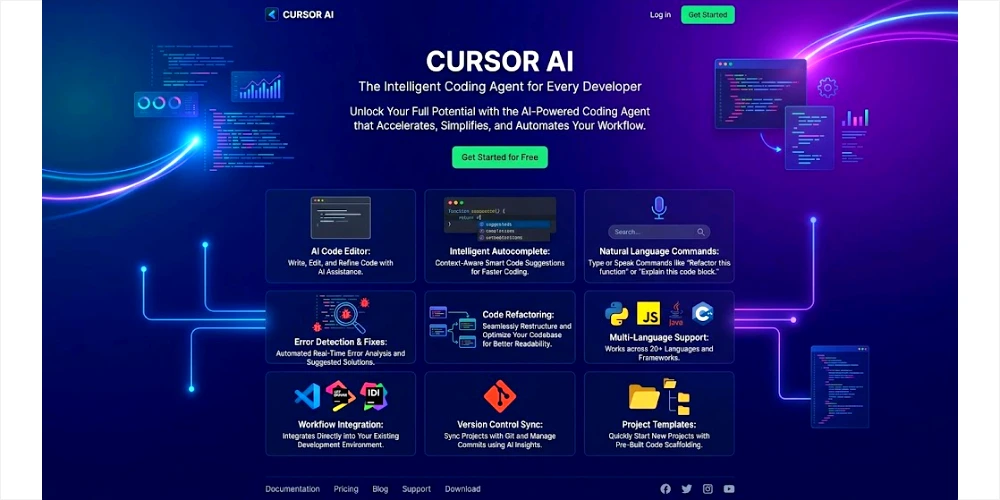
Cursor is an AI-first code editor built as a fork of Visual Studio Code. It goes beyond simple autocomplete. Developers can describe goals in plain language, and the agent can explore a codebase, propose changes across files, run terminal commands, and iterate on results. The developer stays in control by reviewing diffs, approving actions, and testing the output.
This guide explains what the Cursor AI coding agent is, how it works, its main features, how beginners and professionals can use it, pricing considerations, comparisons with tools such as GitHub Copilot, and practical best practices. Features, pricing, and model availability change over time, so always check the official Cursor website and documentation for the latest details.
Readers will learn how to get started, write effective prompts, review AI-generated code safely, and decide whether Cursor fits their workflow.
Table of Contents
What Is Cursor AI Coding Agent?
Cursor AI coding agent is an AI-powered development environment that combines a familiar code editor with agentic capabilities. In simple terms, it is a code editor where you can talk to an AI that understands your project and can act on it.
Traditional editors let you write, edit, and debug code by hand. AI coding assistants typically suggest the next few lines or answer questions in a chat panel. An AI coding agent goes further. You describe a goal, such as “add user authentication with email and password” or “refactor this module to use the new logging utility.” The agent can search the repository, open relevant files, make coordinated edits, run tests or commands, and present the results for review.
Cursor integrates these agent capabilities into an editor that feels similar to VS Code. Many extensions and workflows carry over. The difference is that AI is woven into the editing experience through tab completions, chat, agent mode, plan mode, and related tools.
A practical example: a developer opens a web application and types a request such as “Create a new API endpoint that returns a paginated list of products, including validation and basic error handling. Update the router and add a simple test.” The agent may locate the existing route structure, generate the handler, adjust imports, write a test file, and show a set of diffs. The developer reviews each change, accepts or edits them, and runs the test suite.
This is the core idea of agentic coding: the human sets direction and standards; the agent performs multi-step work under that guidance.
How Does Cursor AI Coding Agent Work?
Cursor’s agent workflow rests on three main pieces: instructions (system guidance and project rules), tools (file search, edit, terminal, web, and more), and a language model chosen for the task. The agent runs in a loop. It decides what to do next based on the current goal and the results of previous tool calls.
Codebase Understanding and Context
Context is critical. An agent that only sees the current file can produce incomplete or inconsistent changes. Cursor indexes or searches the project so the agent can find related modules, types, patterns, and configurations. When you open a folder, the environment can surface relevant files and symbols. Better context usually leads to more coherent multi-file edits.
Natural-Language Instructions
You interact primarily through natural language. Clear goals, constraints, and references to existing patterns improve results. Vague requests such as “make it better” often produce weaker outcomes than specific ones such as “Extract the date-formatting logic into a shared utility and update the three call sites in the reports folder.”
Code Generation, Modification, and Navigation
The agent can create new files, edit existing ones, and navigate the tree. Changes typically appear as diffs that you can accept, reject, or partially apply. This review step is essential. AI-generated code can contain errors, style mismatches, or security issues.
Debugging, Refactoring, and Agentic Workflows
In debugging scenarios, the agent can examine stack traces, search for related code, propose fixes, and suggest tests. For refactoring, it can rename symbols across files, reorganize modules, or introduce abstractions while aiming to preserve behavior. Agentic workflows allow longer sequences: plan, implement, run commands, fix failures, and report back. Cloud agents can run in isolated environments so work continues without monopolizing your local machine.
Throughout, the developer remains responsible for review, testing, and final decisions. The agent accelerates exploration and drafting; human judgment decides what ships.
Key Features of Cursor AI
AI Code Generation
You describe the desired behavior, and the agent generates implementation code. This works for small functions, full components, API handlers, scripts, and more. Quality depends on the model, the clarity of the prompt, and the amount of relevant project context available.
AI Code Completion (Tab)
Cursor’s tab completion predicts the next edit, often spanning multiple lines or related locations. It is designed to feel fast and context-aware, reducing repetitive typing while you stay in flow.
Codebase Context
Instead of limiting itself to the open buffer, the agent can search and reason about a broader set of project files. This supports consistent naming, reuse of existing utilities, and changes that respect architecture boundaries.
Agentic Coding
Agent mode lets the system explore, plan, edit multiple files, run terminal commands, and iterate. Plan mode focuses on producing a reviewable plan before large changes. Debug mode emphasizes investigation with runtime evidence. These modes help match the tool’s behavior to the size and risk of the task.
Debugging and Error Assistance
You can paste errors, point the agent at failing tests, or ask it to investigate a symptom. The agent may instrument code, suggest hypotheses, or propose targeted fixes. Always verify the diagnosis and fix yourself.
Refactoring
Refactoring support includes restructuring modules, extracting functions, updating call sites, and aligning code with new patterns. Large refactors benefit from incremental steps and strong test coverage.
Natural-Language Editing
Select code or describe a change in ordinary language. The agent proposes edits that you review in the editor. This lowers the friction of routine modifications.
Documentation and Explanation
Ask the agent to explain a file, a function, or a design decision. It can generate comments, README sections, or summaries that help onboarding and knowledge transfer. Treat explanations as starting points and cross-check against the actual code.

How to Use Cursor AI Coding Agent
The following walkthrough is intended for first-time users. Exact menus and shortcuts can vary by platform and version; refer to Cursor’s official quick start for current steps.
- Download and install Cursor from the official website for macOS, Windows, or Linux. Sign in with a Cursor account.
- Open an existing project folder or create a new one. Start with a small, well-understood codebase when learning.
- Explore the editor interface. Locate the Agent panel (commonly opened with Cmd+I on Mac or Ctrl+I on Windows/Linux) and familiarize yourself with chat, modes, and model selection.
- Let the agent index or explore the codebase. Ask a simple question such as “Explain the main entry points and overall structure of this project.”
- Request a small, low-risk change. For example: “Add a helper function that formats a date as YYYY-MM-DD and include a unit test.”
- Review every proposed diff carefully. Accept only what you understand and agree with. Edit the generated code when needed.
- Run the relevant tests and the application. Confirm that behavior matches expectations.
- If errors appear, share the traceback or failing test with the agent and iterate. Prefer focused follow-ups over one large vague request.
- Commit the verified changes using your normal version-control workflow. Keep commits small and meaningful.
- Gradually increase task complexity as you gain confidence in review habits and the agent’s strengths and limits on your stack.
Never treat AI output as automatically correct. Review, test, and understand the code before merging or deploying.
Example Prompts for Cursor AI Coding Agent
Effective prompts are specific, constrained, and grounded in the project. Here are realistic examples:
- Create a pure function named calculateDiscount that takes price and percent and returns the discounted amount. Add TypeScript types and a simple unit test.
- Build a responsive product card component in React that displays name, price, and an image. Reuse existing design tokens and spacing utilities from this project.
- This test is failing with the error shown below. Investigate the root cause in the authentication module and propose a minimal fix.
- Refactor the payment processing file to extract the validation logic into a separate module. Update all call sites and keep behavior identical.
- Explain what this service class does, its main dependencies, and the high-level flow when processing The order is called.
- Write unit tests for the existing User Service methods. Cover success paths and the main error cases already handled in the code.
- Add a GET /api/v1/orders/:id endpoint that returns order details for the authenticated user. Follow the patterns used by the existing order routes.
- Identify the slowest parts of this report generation function and suggest concrete performance improvements without changing the public API.
- Add clear JSDoc comments to the exported functions in this module. Keep the tone concise and accurate.
- Update the logging configuration and every place that creates a logger so they use the new shared logger utility. Do not change log levels or message content.
Cursor AI for Beginners
Beginners can use Cursor productively, provided they treat it as a learning aid rather than a substitute for understanding.
Benefits include faster feedback when exploring syntax, explanations of unfamiliar code, and examples of how experienced developers structure solutions. You can ask the agent to break down a concept, show alternative approaches, or walk through a stack trace.
Learning from generated code works best when you read every line, rewrite parts yourself, and experiment with variations. Follow-up questions such as “Why did you choose this data structure?” or “What happens if the input is empty?” turn the tool into a tutor.
Common beginner mistakes include accepting large blocks of code without understanding them, skipping tests, and pasting sensitive information into prompts. Another risk is over-reliance: if the agent disappears or produces weak results on a hard problem, you still need foundational skills.
Should beginners rely completely on AI coding tools?
No. AI coding tools are powerful assistants, not replacements for learning programming fundamentals. Concepts such as control flow, data structures, debugging, testing, and version control remain essential. Use Cursor to accelerate practice and exploration, then verify understanding by writing code without assistance and by explaining solutions in your own words.
Cursor AI for Professional Developers
Professional developers often use Cursor for rapid prototyping, feature implementation, targeted debugging, refactoring, test generation, documentation drafts, and exploration of unfamiliar or legacy codebases. Boilerplate reduction and consistent application of project patterns can free time for higher-value design and review work.
Agentic workflows and cloud agents support longer tasks that would otherwise interrupt local focus. Code review assistance and automation features can help surface issues earlier. The practical value depends on project complexity, model performance on your languages and frameworks, prompt and rule quality, and the discipline of human review.
Teams should align on privacy settings, secret handling, and review standards. Cursor is most effective when it fits into an existing engineering culture that values testing, small commits, and clear ownership.
Advantages of Cursor AI Coding Agent
- Natural-language interaction reduces friction for many routine tasks.
- Codebase-aware assistance supports more coherent multi-file changes than single-buffer tools.
- Faster drafting of features, tests, and boilerplate can shorten iteration cycles when paired with solid review.
- Help with debugging and explaining unfamiliar code supports both learning and maintenance.
- Agent modes and cloud agents enable longer, more autonomous work sessions under human supervision.
- A familiar VS Code-like environment lowers the switching cost for many developers.
Results vary by individual, codebase, and task. Productivity gains are not guaranteed and should be measured against your own workflow.
Limitations and Disadvantages of Cursor AI
A balanced view is important for credibility and safe adoption.
- AI-generated code can contain subtle bugs, security flaws, or style violations.
- The agent can misunderstand requirements or miss important edge cases.
- Large or poorly structured projects may require careful context management and incremental requests.
- Generated code still needs thorough testing and human review before production use.
- Models may produce verbose, inefficient, or unnecessary code.
- Privacy and data-handling policies matter; sensitive code requires deliberate configuration.
- Costs can grow with heavy agent usage depending on plan and model choice.
- Over-dependence can weaken core programming skills if not balanced with deliberate practice.
These limitations do not make the tool unusable; they define the boundaries within which careful developers can benefit.
Cursor AI Pricing
Pricing, included usage, models, and plan features change. The information below reflects publicly listed individual and team options around August 2026. Always verify current details on the official Cursor pricing page before making decisions.
As of recent public listings:
- Hobby (Free): Limited agent requests and access to Composer; suitable for evaluation.
- Pro (approximately $20 per month): Extended agent limits, access to frontier models, cloud agents, and related features.
- Higher individual tiers (such as Pro+ and Ultra) offer increased usage allowances for heavier agent use.
- Teams plans (starting around $40 per user per month) add centralized billing, admin controls, privacy mode enforcement, SSO options, and collaboration features.
- Enterprise plans are custom and typically include pooled usage, advanced security controls, audit capabilities, and support.
Usage is often measured against included model capacity, with on-demand charges possible after limits. Model choice affects consumption. Privacy mode and team policies influence data handling. Check the official documentation for the exact definitions of included usage, auto-routing, and any first-party versus third-party model pools.
Cursor AI vs. GitHub Copilot
Both tools assist with AI-powered coding, but they differ in product shape and emphasis. Cursor is a standalone AI-first editor (VS Code fork) with strong multi-file agent workflows. GitHub Copilot is primarily an assistant that integrates into many existing editors and the GitHub ecosystem.
| Category | Cursor | GitHub Copilot |
| Product form | Standalone AI-first editor | Extension across many IDEs + GitHub |
| AI-assisted coding | Deep agent modes, multi-file edits | Strong chat and agent features, improving |
| Code completion | Highly context-aware tab completions | Mature inline completions in host editors |
| Agentic workflows | Core focus: local and cloud agents | Available; often tied to GitHub workflows |
| Codebase context | Strong project-aware retrieval | Good, especially with workspace features. |
| IDE flexibility | Primarily the Cursor app | VS Code, JetBrains, Neovim, and more |
| Beginner usability | Familiar if you know VS Code | Easy drop-in to existing tools |
| Pricing (verify current) | Hobby free; Pro ~$20/mo | Free tier; Pro often has a lower entry price |
There is no universal winner. Choose Cursor if you want an AI-native editor and deep agentic multi-file work. Choose Copilot if you need broad IDE support, tight GitHub integration, or a lower switching cost for your team. Many organizations evaluate both against real projects and compliance requirements.
Cursor AI vs. Other AI Coding Tools
The landscape includes several strong options. Claude Code (from Anthropic) is a powerful terminal-oriented agent suited to long autonomous sessions. OpenAI’s Codex-related tools emphasize cloud and headless workflows. Windsurf (rebranded in parts of the market as Devin Desktop under Cognition) offers another AI-native IDE experience with its own agent style. Other editors and plugins continue to add agent features.
When comparing, examine the surface (IDE vs. terminal vs. cloud), model access, multi-file editing quality, privacy controls, pricing, and how well the tool fits existing team processes. Official documentation and short proof-of-concept trials on your own repositories provide better evidence than marketing claims alone.
Is Cursor AI Safe to Use?
Safety depends on configuration, policy, and habits.
Cursor provides a privacy mode. When enabled, code data is not used for training by Cursor or its model providers under the stated zero-data-retention arrangements. Teams can enforce Privacy Mode organization-wide. Code is still sent to model providers to generate responses; Privacy Mode governs training and retention, not the fact of transmission for inference.
Cloud agents and indexing involve additional data flows. Review the official security and data-use pages for current sub-processors, encryption, and retention details. Cursor publishes SOC 2 Type II information through its trust center.
Practical rules: never place passwords, API keys, tokens, or personal data into prompts or code that will be sent to AI services. Use secret managers and environment variables. Follow company policies on confidential code. Review generated code for security issues. Prefer Privacy Mode for sensitive work. Confirm current guarantees on cursor.com before using the tool with regulated or highly confidential projects.
Best Practices for Using Cursor AI Coding Agent
- Write clear, specific prompts that state the goal, constraints, and relevant files or patterns.
- Provide sufficient context; reference existing utilities and conventions instead of asking the agent to invent everything.
- Break large tasks into smaller steps with review points between them.
- Review every important code change. Understand what the diff does before accepting it.
- Run tests and exercise the changed paths after modifications.
- Use version control. Commit frequently so you can isolate and revert AI-assisted changes.
- Never expose secrets, credentials, or private customer data in prompts or unreacted code.
- Ask the agent to explain unfamiliar code, then verify the explanation against the source.
- Verify new dependencies for license, maintenance status, and security before adopting them.
- Keep human oversight at the center of design decisions, architecture, and release criteria.
Common Mistakes When Using Cursor AI
- Giving vague instructions and expecting perfect results.
- Accepting generated code without reading or testing it.
- Asking the agent to change too many things in one request.
- Ignoring compiler, linter, or test errors after applying changes.
- Skipping tests or manual verification of behavior.
- Pasting secrets or confidential data into the chat.
- Assuming AI output is automatically secure or production-ready.
- Deploying code you cannot explain or maintain.
What is Cursor AI, a coding agent?
Cursor AI coding agent is an AI-powered code editor (a VS Code fork) that lets developers describe goals in natural language. The agent can explore a codebase, edit multiple files, run commands, and help with debugging and refactoring while the developer reviews the results.
Is Cursor AI free?
Cursor offers a free Hobby plan with limited agent requests. Paid plans unlock higher limits and additional features. Check the official pricing page for current details.
Is Cursor good for beginners?
Yes, when used as a learning and productivity aid. Beginners should still study core programming concepts and review all generated code carefully.
Is Cursor better than GitHub Copilot?
It depends on workflow. Cursor emphasizes an AI-native editor and strong multi-file agents. Copilot emphasizes broad IDE support and GitHub integration. Evaluate both against your stack and team needs.
Can Cursor write an entire application?
It can generate substantial portions of an application under guidance, but complex systems still require human architecture, review, testing, and iterative refinement. Treating it as a full autonomous replacement for developers is not realistic.
Can Cursor debug code?
Yes. You can share errors, ask for investigation, and request fixes. The quality of the diagnosis and the safety of the fix still depend on human verification.
Can Cursor work with large codebases?
Cursor is designed to work with project-scale context. Very large repositories benefit from focused requests, good project structure, and careful context management.
Is Cursor an IDE?
Yes. It functions as a full code editor and development environment with AI agent capabilities built in.
Does Cursor support multiple programming languages?
Yes. As a VS Code-based editor, it supports a wide range of languages through language servers and extensions, subject to model and tooling quality for each language.
Is Cursor safe for professional development?
Many professionals and teams use it. Safety depends on enabling appropriate privacy settings, following secret-handling practices, reviewing generated code, and complying with organizational policies. Review official security documentation.
Can Cursor replace a software developer?
No. It is a tool that amplifies developer productivity. Architecture, product judgment, accountability, and complex problem-solving remain human responsibilities.
What are the best alternatives to Cursor?
Common alternatives include GitHub Copilot, Claude Code, OpenAI coding agents/tools, and other AI-native editors such as Windsurf/Devin Desktop. The best choice depends on IDE preference, agent style, pricing, and compliance needs.
Final Verdict
Cursor AI coding agent is a capable AI-first development environment that combines a familiar editor experience with agentic workflows for generation, multi-file editing, debugging, and exploration. It is useful for beginners who treat it as a learning companion and for professionals who want faster iteration under disciplined review.
Its strengths lie in natural-language interaction, codebase-aware assistance, and the ability to tackle multi-step tasks. Its limitations—occasional errors, the need for careful context and review, privacy considerations, and variable costs—mean it works best as a partner, not an autonomous replacement.
Developers who combine clear prompts, thorough review, solid testing, and continuous learning of fundamentals will get the most value. Always consult Cursor’s official documentation for the latest features, pricing, models, and privacy controls before adopting it for critical work.
The practical takeaway is simple: use the agent to move faster on well-scoped tasks, keep human judgment at the center of quality and security, and measure results on your own projects rather than relying on generalized claims.




