
August AI Your 24/7 Health Companion: Complete Guide to Features, Tracking and Daily Use (2026)
now
20.6MB
V1.1.71
7M+
Description
Introduction
For years, health apps have promised to be your personal doctor on your pocket, yet the majority of them fall short somewhere between the advertisement and the real-world experience. One of the more recent names attempting to close that gap is August. Since its release, this mobile app which combines a health chat bot, meal and activity tracking, and customized lifestyle advice has quickly gained popularity. This article explains what August AI does, how monitoring and insights operate on a daily basis, how much it costs, and where it fits if you’re considering adding it to your phone.
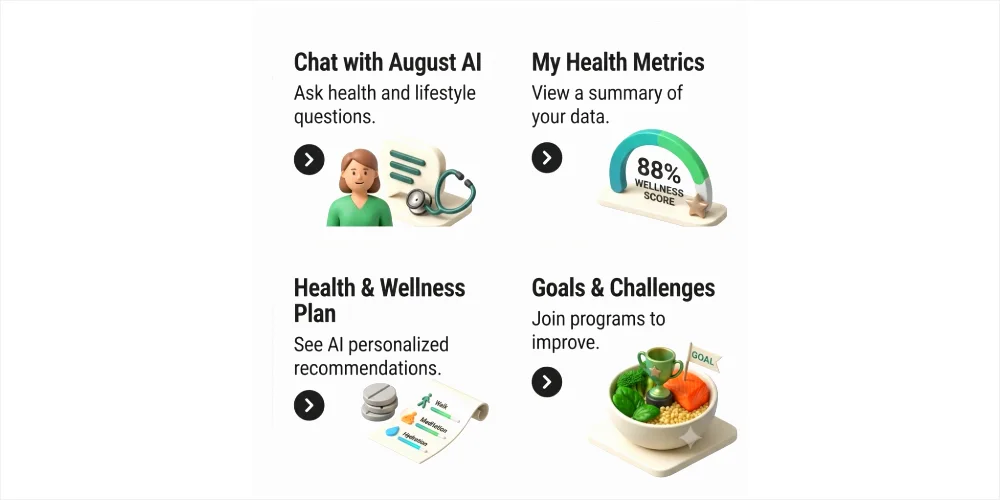
Table of Contents
What is AUGUST AI?
Goodness Factory Living Essentials created the AI-powered health companion app August, which is accessible on iOS and Android. Fundamentally, it functions as a health-focused chat assistant that you may contact at any time of day with inquiries concerning symptoms, drugs, diet, or overall wellness. It also has integrated capabilities for tracking activity, recording meals, and examining lab results or uploaded prescriptions.
The conversational aspect still seems to be its best feature because it began as a WhatsApp-based health chat bot before developing into whole independent software.
It answers with context-aware advice rather than a strict symptom checklist when you communicate with it in the same straightforward manner as you would with an informed friend.
August is clear that it should be used in addition to your standard medical care, not in place of it. Instead of diagnosing or treating anything on its own, it is designed to help you understand what you’re dealing with, prepare better questions for a real doctor, and maintain a running record of your health behaviors.
Key Features of August Health App
Here are the some primary features August health app offers:
| Feature | What It Does |
| Health chat assistant | Answers questions about symptoms, medications and general health topics in plain language. |
| Meal logging | Log meals by typing, photo, or barcode scan, with nutrition breakdowns and streak tracking. |
| Vital sign tracking | Records metrics like weight, blood pressure and other logged vitals over time. |
| Lab and prescription upload | Upload reports or prescriptions and get a plain-language explanation of what they mean. |
| Personalized insights | Wellness content and tips shaped around your logged habits and goals. |
| Incognito Chat Mode | Private conversations that don’t get saved to your regular chat history. |
| Online doctor visits | Optional paid consultations with a licensed physician, starting around minimum 39 dollar. |
| Platform availability | iOS and Android, free to download and use for core features |

How august tracks vital signs and daily activities
At least for the majority of metrics at this time, August’s tracking component relies on manual logging rather than automatically extracting data from a wearable. The app maintains a running history that you may review when you submit data such as weight, blood pressure, or other vitals you’ve measured elsewhere. That requires a little more work than a device that syncs automatically, but it also means that anyone can use it, regardless of whether they own a fitness band or smart watch.
August’s conversation assistant can assist you in understanding the meaning of a reading in addition to the numbers you enter. For instance, if you ask it if a blood pressure reading is within a normal range, it provides you with a straightforward response rather than requiring you to do your own research.
Since a logged figure by itself doesn’t tell you much without context that may be more helpful for the majority of people than the raw tracking.
Additionally, the app allows you to instantly upload lab reports and prescriptions, and it will explain the results in plain language. This is one of the more really helpful things available for anyone who has ever stared at a lab report full of acronyms and reference ranges and had no idea what half of it meant.
Meal logging and nutrition tracking on August APP
August has obviously put a lot of thought into the design of nutrition tracking. Without having to manually search a food database, you may track a meal by inputting what you ate, taking a picture of your plate, or scanning a barcode. The software then breaks everything down into calories and macronutrients.
On top of the standard logging is a feature called Nutrition Streaks. Your streak will increase if you record at least one meal each day, with little daily goals encouraging you to continue. When a day is missed, the streak doesn’t entirely reset to zero; instead, it simply needs one more meal to resume. This relieves some of the pressure that many tracking applications inadvertently put on habit formation.
Portion sizing can be a touch off, according to some early users, especially when foods are measured in cups and the app doesn’t always allow you to adjust the precise amount. It’s important to consider whether you’re recording for accurate calorie counts as opposed to a broad understanding of your eating habits.
Symptom Guidance and Doctor Visit Preparation
Talking through a symptom or a troubling time immediately after it occurs and having that record to bring to an actual visit is one of the most useful everyday uses individuals mention. For instance, instead of attempting to remember specifics at a pediatrician visit days later, a parent dealing with a child’s asthma crisis can discuss what happened while it’s still fresh. A doctor would typically find that type of contemporaneous note-taking more helpful than a hazy recollection of symptoms from a week ago.
The underlying model’s performance on the US Medical Licensing Exam has been promoted by August’s developers as an indicator of how trustworthy its responses are supposed to be. Since exam performance and real-world clinical judgment isn’t exactly the same thing, it’s better to regard that as a marketing claim about the AI’s test performance rather than a guarantee about real-world medical correctness. For anything that genuinely requires a prescription or clinical decision, the app also provides paid online consultations with credentialed doctors; these visits typically start at about 39 dollar.
Privacy and data security
Before uploading lab results or recording daily symptoms, it’s reasonable to inquire about August’s handling of health data, which is about as sensitive as personal data gets. The platform is HIPAA-compliant, GDPR-ready, and prohibits the sale or monetization of personal health information, according to the company, which also claims that data is encrypted both in transit and at rest.
For chats you’d prefer not to have preserved to your regular history, the app offers an Incognito Chat Mode. This is a helpful feature if you have sensitive questions and don’t want them to appear in a searchable chat log. August also states on the Android listing that it may share certain data types with third parties, such as location and device identifiers. This is common for most apps, but it’s always advisable to review the app’s privacy information before deciding how much you want to log.
August Pricing: Free vs. Premium
| Plan | What’s Included |
| Free | Full access to chat, meal logging, tracking and insights, no subscription required in the US |
| Premium | Removes ads, adds a dark theme and additional customization options |
| Online doctor visits | Pay-per-visit consultations with a licensed physician, starting around 39 dollar |
In contrast to most healthcare apps that block basic access behind a barrier, August’s essential health features are free to use for US customers without the need for a subscription or insurance. Instead of giving you access to capabilities you wouldn’t otherwise have, the premium tier offers a dark theme, an ad-free experience, and more polish than functionality. The optional medical visit, which operates more like a stand-alone telehealth booking than a subscription element, is the only instance where actual money is used.
Pros and Cons of August Health App
| Pros | Cons |
| Core features are free with no subscription required in the US | Vital sign tracking is manual rather than synced from wearables |
| Chat assistant remembers context across conversations | Portion sizing for some foods can be imprecise |
| Lab report and prescription uploads get plain-language explanations | Not a substitute for professional diagnosis or treatment |
| Nutrition Streaks make daily meal logging easier to stick with | Some users report occasional bugs, like errors on specific chat questions |
| Incognito Chat Mode for private conversations | Data sharing with some third parties is disclosed on Android, worth reviewing |
Who August Is Best For
For those who want a single location to track a few basic vitals, document meals, and ask questions about their health without having to wait for an appointment, August makes the most sense. Because the streak system and photo logging reduce a lot of the manual entry labor, it’s a fantastic fit if you’re trying to develop a regular nutrition logging habit and find other meal trackers too time-consuming to keep with.
It is less appropriate for people who are managing a condition that actually calls for clinical supervision rather than general advice, or who require continuous, automated vital monitoring synchronized from a medical device. August is not the best tool for managing your treatment in certain situations, but rather a complement where you can keep track of everything and prepare questions for your real doctor.
How August Compares to Other Health AI Tools
There are other companies currently developing AI health companions besides August. With products like Copilot Health, which focuses more on combining lab findings, wearable data, and medical records into a single profile and is supported by a more extensive clinical review process, bigger companies like Microsoft have joined the same market. In contrast, August’s strategy, which is based on a conversational assistant and manual tracking rather than extensive connectivity with current health data or devices, feels lighter and more customer-focused. That difference isn’t necessarily a downside.
A lighter, chat-first app is easier to pick up without linking accounts or devices, and it’s arguably a better fit for someone who just wants a straightforward way to log meals and ask the occasional health question, rather than someone managing a complex medical history across multiple providers
Getting Started with August
August doesn’t require anything up front and only requires a few minutes to set up. After downloading the app and setting up an account, you must respond to a brief series of questions about your age, current medical issues, basic health history, and intended use of the program. You may then quickly access your tracked vitals, meal logging, and chat assistant on the main screen.
1. Get August from Google Play or the App Store.
2. Register and finish the brief onboarding survey.
3. Enter, take a picture, or scan a barcode to record your first meal.
4. Add any vital signs, such blood pressure or weight that you wish to begin monitoring.
5. If you have any questions about your health, start a dialogue with the chat bot.
The barrier to access is kept low because there is no waiting time or additional verification step beyond the simple sign-up. There isn’t much of a drawback to giving it a try for a week or two to see if the daily logging habit stays, given the free pricing scheme for US customers.
What Makes August Different from a Regular Fitness App
It’s important to understand how August differs from a typical step counter or calorie tracker. The majority of fitness applications approach. everything else as an add-on feature and are based on a single core indicator, such as steps, calories, or exercises recorded. August begins in the other direction. The tracking features are designed to complement the chat assistant and health advice, not to be the main focus of the app.
Throughout the software, that appears in subtle ways. You are left to interpret the calorie figure displayed by a standard fitness tracker. August’s helper can identify trends over time, clarify what that figure actually means for your particular objectives, and respond to a follow-up inquiry if something doesn’t make sense. It’s more about knowing what’s happening with your health on a daily basis than it is about attaining an objective.
What Users Say About August
With over a thousand reviews, August presently has a 4.4 rating on the Google Play Store, indicating a generally favorable reaction with some minor issues still being resolved. The chat assistant’s ability to remember context from previous conversations, which eliminates the need for users to re-explain their health history each time they launch the app, and how seamless the onboarding process is in comparison to other health apps that require extensive setup before offering any benefits are the main points of praise.
Instead of being dispersed equally throughout the app, the criticism frequently concentrates around a smaller number of problems. Certain chat queries that generate generic error messages have caused issues for some reviewers. Given the true sensitivity of the data involved, others have called for more robust security alternatives, such as fingerprint locking. Precision in food quantity is also a common issue, especially when meals are measured in cups rather than more precise units. On their own, none of them are deal-breakers, but it’s better to be aware of them before using the app than to find out about them after you’ve developed a recording habit.
Is August free to use?
Yes, the core features are free for users in the US, with no subscription or insurance required. A premium tier removes ads and adds a dark theme, and online doctor visits are a separate paid add-on.
Does August replace my doctor?
No. It’s built to complement regular healthcare by helping you understand symptoms and prepare for appointments, not to diagnose or treat anything on its own.
Can August track data from my smart watch automatically?
Most tracking in August currently works through manual logging rather than automatic syncing from wearable’s, so you’ll need to enter readings like weight or blood pressure yourself.
Is my health data safe on August?
The app states that data is encrypted in transit and at rest, and describes itself as HIPAA-compliant and GDPR-ready. It’s still worth reviewing the app’s own privacy details, since some data types are disclosed as shareable with third parties on Android.
What is Incognito Chat Mode?
It’s a setting that lets you have conversations with August that aren’t saved to your regular chat history, useful for anything you’d rather keep out of a searchable log.
How much do online doctor visits cost on August?
Visits with a licensed physician generally start around $39, billed per visit rather than as part of a subscription.
Can August read my lab reports?
Yes, you can upload lab results or prescriptions and the app will explain what the findings mean in plain language, though it’s still worth reviewing anything important with your actual doctor.
Is August available outside the US?
The app is available on iOS and android in multiple regions, though free access and specific features like online doctor visits may vary depending on where you’re located.
Does August work without an internet connection?
No. Since the chat assistant and insights rely on processing your data through the app’s servers, you’ll need an active internet connection to use most of August’s features.
Can I export my health data from August
The app is built around keeping your logged data within the platform for ongoing tracking and insights. If you need records for a doctor’s visit, the lab and prescription upload history and chat conversations are generally viewable within the app itself.
Conclusion
August is part of a growing group of AI health apps that aim to reduce the burden of routine health tracking and basic advising. The conversation assistant retains context better than a standard health chat bot, the meal logging is actually well built, and the free price model in the US eliminates a hurdle that many rival applications still have.
It does not attempt to be a doctor, nor is it a substitute for one. It works effectively as a daily log and as a first port of call for inquiries prior to an appointment. It’s a far shakier bet when used as your sole source of medical advice, so it’s important to bear that in mind before depending too much on it.




